Microsoft Teams is well suited as a starting point for AI agents because, in many organisations, it is already the everyday workspace for communication, coordination and internal service processes. A Teams-based AI agent does not need to establish a new interface, but can integrate knowledge-based queries, self-service options and guided processes directly into existing workflows.
This leads to faster adoption, measurable benefits and a robust foundation for future service agents in customer-facing roles.
From CreaLog’s perspective, Microsoft Teams is therefore not an isolated channel, but a pragmatic starting point for a broader AI agent strategy. The AI agent appears where employees are already working. Behind the scenes, the CreaLog platform ensures that dialogues, knowledge access, roles, approvals, backend integrations and monitoring interact in a controlled manner. This avoids creating an additional AI silo, instead resulting in a service module that can be expanded step by step.
Many companies are currently exploring the use of AI agents in customer service. The discussion often begins with models, data sources, interfaces, governance and backend integration. These topics are important. But they do not answer the first practical question: Where do employees encounter the AI agent in their day-to-day work?
Adoption happens where people work, search, ask questions, make decisions and initiate processes. This is precisely why Microsoft Teams is an obvious starting point for AI agents within the organisation.
Teams is already well established in many organisations. Employees use it on their desktops, in their browsers and on mobile devices. Groups, permissions, app deployment and communication routines are already in place. This means the AI agent does not need to be introduced as yet another system. It can appear as a digital colleague right where service work takes place anyway.
The AI agent does not have its own workspace. It works where its human colleagues are already working.
A Teams-based AI agent is a digital assistant used directly within Microsoft Teams to support staff with knowledge-based queries, internal service processes or guided self-service. It not only answers questions, but can also identify issues, draw on relevant sources, guide users through process steps and prepare or trigger defined actions in a controlled manner.
This is what distinguishes a Teams-based AI agent from a simple chatbot. A chatbot often stops at simply providing an answer. A service agent links the answer, context and next action within clearly defined process and security boundaries.
Our AI platform allows AI agents to be deployed directly within Microsoft Teams – as an app in the familiar working environment, accessible on desktop, in a browser or on mobile devices. Access remains simple for employees: they simply ask their question or start a dialogue in Teams. For operational purposes, the key control elements remain within the platform: permissions, sources, approvals, workflows, logging and monitoring.
A sensible starting point is not the most complex customer processes. It begins with recurring internal enquiries that occur frequently, are clearly defined and yet still take up time.
Typical questions include:
“How do I request holiday?”
“How do I request access to a system?”
“Who is responsible for this customer?”
“Where is the current template?”
“What are the rules regarding sick leave?”
“I’ve forgotten my password.”
Such questions may seem simple. Yet they are relevant to service operations because they tie up capacity, generate follow-up enquiries and reveal how well internal knowledge is actually maintained. An AI agent in Teams displays sources, opens forms, identifies who is responsible or initiates processes. The value lies not only in the individual answer. It also lies in the fact that staff experience how AI provides concrete help without interrupting their workflow.
Internal use cases are a sensible way to get started with AI agents because they quickly demonstrate the benefits whilst remaining manageable. Companies can begin with common, clearly defined scenarios without immediately automating highly complex customer processes.
This allows acceptance, the quality of knowledge, dialogue management, authorisations and process logic to be tested step by step. The first AI agent does not have to be a comprehensive customer service agent. Often, an internal Teams agent for recurring service enquiries is the better place to start.
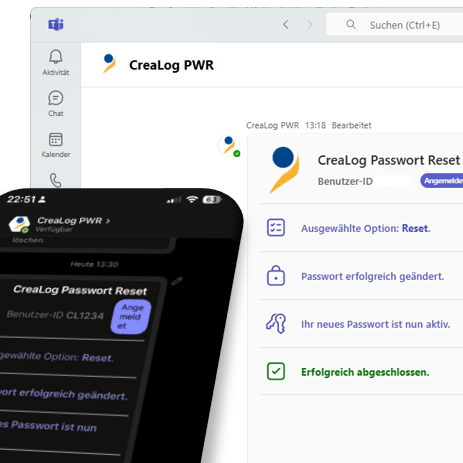
An automated password reset in Teams is a good example of the transition from information to action. The AI agent does not merely answer the question of how a reset works. It guides the user through a clear dialogue, verifies identity and authorisation, requests the necessary information and then, once the case is closed, triggers a controlled backend action.
Not every use case needs to be spectacular. What matters is that it demonstrates a reusable pattern. An AI-powered Teams agent recognises an enquiry, guides the user, verifies authorisation, initiates a controlled backend interaction, carries out an action and documents the result. This pattern can later be applied to many service scenarios and processes.
An AI agent in a service context follows a repeatable workflow: it identifies the enquiry, gathers the necessary context, verifies identity and authorisations, accesses approved information or tools, carries out or prepares a defined action, and documents the result.
This workflow becomes particularly tangible in Microsoft Teams. The interface remains familiar, the dialogue remains accessible, but the process logic in the background determines quality and security. In this way, a chat becomes not just a reply, but a controlled service process.
The focus on Teams does not mean that architecture becomes unimportant. On the contrary: precisely because Teams makes access so easy, there must be clear rules in the background governing what an agent is permitted to see, know and trigger.
A bot that merely speaks can be impressive. An AI agent that takes action requires control.
As soon as an agent resets passwords, creates tickets, queries status information or initiates processes, requirements arise regarding roles, permissions, logging, approvals, monitoring and fallback rules. The CreaLog platform handles precisely this functionality: it combines easy access via Teams with operational control in the background.
This includes guided dialogues, rights and authorisation models, controlled backend integration, knowledge access, monitoring and logging. This makes the agent not only usable but also operationally viable.
The Model Context Protocol, or MCP for short, establishes a controlled connection between AI agents and enterprise systems. It prevents uncontrolled direct access to backend systems and instead provides defined tools, data sources and actions via a governance layer. MCP enables AI agents to operate effectively in customer service without relinquishing control over backend systems, data and processes.
For the AI agent in Teams, this means it can appear natural in conversation whilst its actions remain controlled. Authentication, authorisation, filtering, logging, approvals and monitoring are not left to the language model, but are regulated via the platform and the connection layer.
What is trialled internally via Teams can later be transferred to other channels and service contexts: voice, chat, messenger, web, app or contact centre. To this end, the CreaLog AI platform combines free-form dialogue, RAG-based knowledge utilisation, MCP-based tool utilisation, rights and authorisation models, monitoring, graphical workflows, low-code configuration and operation in cloud or on-premises scenarios.
This offers a practical advantage for businesses: an initial use case does not end as an isolated pilot. It can be further developed, expanded and transferred to other channels on the same platform without having to rebuild the underlying governance framework.
A possible development path: first, an internal Teams agent for common knowledge and self-service scenarios. Then controlled actions such as password resets, request processes or queries regarding responsibility. Finally, the extension to customer-related service interactions within the context of CRM, ticketing and knowledge management.
Getting started with AI agents doesn’t have to be complicated. Microsoft Teams offers organisations a pragmatic way to integrate AI into day-to-day service operations.
Internal use cases such as knowledge searches, responsibility checks, templates, access requests or password resets quickly demonstrate whether an agent provides genuine value. They build acceptance, improve the quality of knowledge and highlight which processes can be safely automated.
The architecture remains crucial as the foundation for reliable, scalable operations.
CreaLog supports this approach with a platform that combines a low-threshold entry point via Microsoft Teams with the requirements of a productive service operation.
MS Teams makes getting started easy. The platform ensures secure operations. MCP and governance transform a helpful AI assistant into a controlled, capable AI service agent.